
.png)
SoundCloud
Downloader To MP3
Download any SoundCloud Song or
WAV
AAC
FLAC
MP3
Try our SoundCloud Downloader above for free SoundCloud song downloads. Want more features? Try Premium today.

Your Guide to Seamlessly Converting SoundCloud to MP3
Introduction
In the dynamic world of music-sharing platforms, SoundCloud stands out as a key player for finding and sharing fresh tracks. However, what if you want to listen when you're offline or add those tunes to your personal library? That's where SoundCloud downloaders and converters like MusicVerter come in handy. These tools provide a straightforward way to convert your favorite SoundCloud tracks to MP3, letting you enjoy them whenever and wherever you wish. Let's dive into how you can effortlessly download from SoundCloud and convert tracks with ease.

How to Use Online Downloaders
Downloading music from SoundCloud is a breeze. Here’s a user-friendly guide on how to turn SoundCloud tracks into MP3 files using online tools like MusicVerter:
- Copy the URL: Go to the SoundCloud track you want to download. Click 'Share' to grab the track's URL.
- Visit a Reliable Downloader: Open a trustworthy downloader website such as MusicVerter. This tool is perfect for downloading individual songs or entire playlists effortlessly.
- Paste the URL: Insert the copied URL into the input field on MusicVerter.
- Select Format and Quality: Choose your preferred format and audio quality, like MP3 320kbps for excellent sound quality.
- Download Your Track: Hit the 'Download' button, and soon, your track will be ready for offline enjoyment.

These steps make downloading SoundCloud tracks a straightforward task, especially with a tool like MusicVerter, which also allows you to download entire playlists, saving you plenty of time.
SoundCloud's Built-in Options
Although third-party tools expand your options, SoundCloud itself offers a way to download songs directly—if the artist has enabled this feature. Here's how:
- Look for a Download Button: On the track’s SoundCloud page, spot a 'Download' button below the waveform, indicating the artist allows downloads.
- Download Directly: Click this button to save the track straight to your device.

This method is ideal for artists wanting to share their work freely, letting listeners enjoy their music offline legally and easily.
Comparison of Different Tools
Choosing the best SoundCloud to MP3 tool involves considering various factors. Here's a snapshot comparison of popular tools based on user experience and features:
| Tool | Ease of Use | Ad-Free Experience | Formats Supported | Playlist Support | |------------------|-------------|--------------------|-------------------------|------------------| | MusicVerter | Excellent | Yes | MP3, WAV, AAC, FLAC | Yes | | Soundclouddl.cc | Moderate | No | MP3 | Yes |
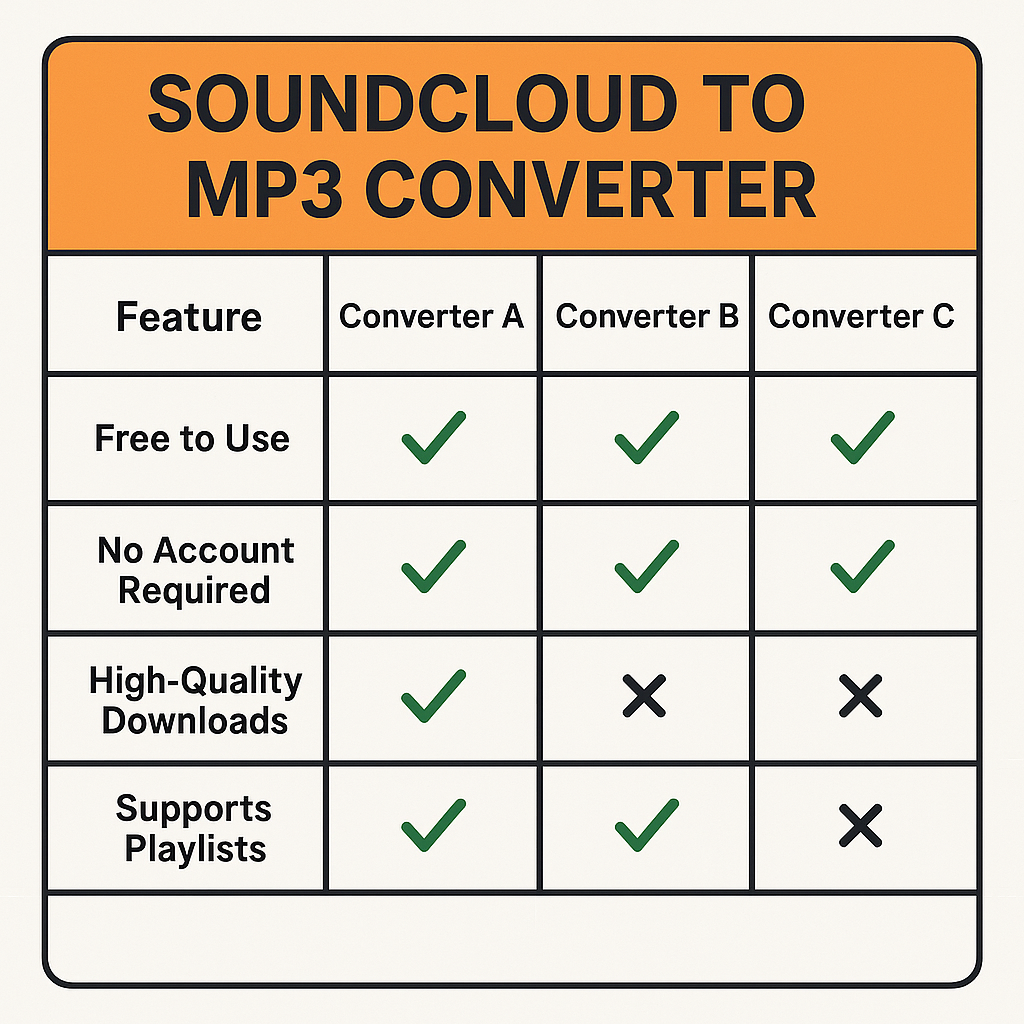
MusicVerter shines with its ad-free environment and diverse format support, making it an excellent choice for high-quality downloads without distractions. It ensures quick downloads and offers flexibility in choosing the desired output format.
Conclusion
Converting and downloading music from SoundCloud has never been easier with tools at your disposal. Whether you're using an online SoundCloud downloader like MusicVerter or leveraging SoundCloud’s own download features, you’re set for a seamless offline listening experience. With its user-friendly nature and robust features, MusicVerter is a top pick for those looking to download SoundCloud playlists effortlessly. Try it out today and elevate your music listening moments!
FAQs
Q: How do I download songs from SoundCloud?
A: It's easy! Just copy the track's URL, visit a service like MusicVerter, paste the link, and select your format to start downloading.
Q: What's the best SoundCloud to MP3 converter?
A: MusicVerter is highly recommended for its ease of use, lack of ads, and support for various formats including top-quality MP3 320kbps.
Q: Can I convert SoundCloud to MP3 320kbps online?
A: Absolutely! You can convert SoundCloud tracks to MP3 320kbps effortlessly with MusicVerter, enjoying high-quality audio with minimal hassle.

About the Author


