
.png)
SoundCloud
Downloader To MP3
Download any SoundCloud Song or
WAV
AAC
FLAC
MP3
Try our SoundCloud Downloader above for free SoundCloud song downloads. Want more features? Try Premium today.

Mastering SoundCloud Downloads: Your Safe Playlist Companion
Introduction
SoundCloud is a favorite for music lovers and creators alike, yet one common frustration is figuring out how to download playlists directly to MP3 for offline enjoyment. Though SoundCloud offers limited download options, many users need more flexibility to keep their favorite tracks and playlists easily accessible. This is where SoundCloud downloaders and converters step in, offering a straightforward solution. In this guide, we'll dive into how you can seamlessly use a SoundCloud downloader to convert and enjoy playlists offline, safely and with ease.
Official SoundCloud Download Options
While SoundCloud allows some direct downloads with specific plans like SoundCloud Go+, it doesn't support entire playlist downloads. This can be a hurdle for those wanting more control over their music. As a result, many turn to third-party tools which provide more comprehensive options for downloading and enjoying their favorite tunes.
Safe Methods for Downloading SoundCloud Playlists
Looking to download music from SoundCloud both safely and efficiently? Desktop tools such as Cisdem VideoPaw and Downie are your reliable allies. Here’s how you can use these services:
- Install the Software: Begin by downloading a trustworthy SoundCloud downloader like Cisdem VideoPaw or Downie.
- Grab the Playlist URL: Simply navigate to your chosen SoundCloud playlist and copy the URL.
- Input the URL: Launch the software and paste the playlist URL into the downloader.
- Choose MP3 Format: Select MP3 as your output format to ensure quality, such as Convert SoundCloud to MP3 320kbps if that's your aim.
- Initiate Download: Start the download and let the software convert and save your playlist to your device.
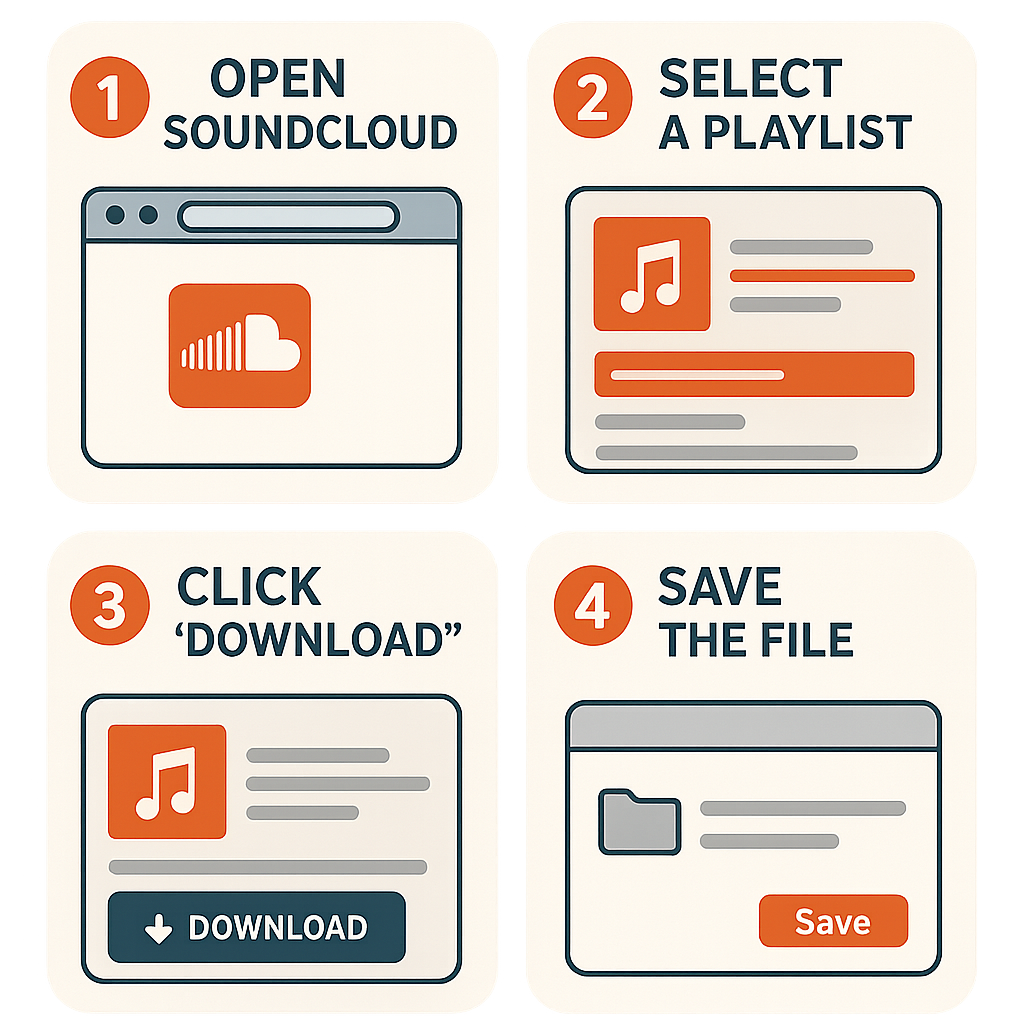
These programs help retain the quality of your music, providing you a flawless offline experience.
Mobile and Online Solutions
For those who prefer convenience, mobile applications and online services offer quick alternatives. Apps available on platforms like Setapp or certain browser extensions can rapidly convert and download SoundCloud tracks. But be cautious—ensure you're using reputable services to avoid unwanted programs or pop-ups. Keeping your antivirus updated can add an extra layer of safety.
![SoundCloud Downloader]()
Transferring and Managing Music Across Devices
Once you've downloaded your playlists, transferring them across devices is a breeze. Tools like AnyTrans streamline this, allowing easy organization and management of your music files. They preserve important information, like artist and album details, so your playlist remains in perfect order no matter where you listen.
Conclusion
Downloading and converting SoundCloud playlists to MP3 can be a simple and safe process with the right tools. Whether you opt for desktop solutions like Cisdem VideoPaw or a user-friendly organizer like AnyTrans, there's a method to suit your needs. For a trusted recommendation, explore Musicverter's SoundCloud to MP3 converter and start enjoying your music offline without hassle. Give these solutions a try today—enjoying your favorite tracks for free has never been easier!
FAQs
Q: How do I download songs from SoundCloud?
A: To download songs from SoundCloud, use a reliable SoundCloud downloader like Cisdem VideoPaw. Just copy the song's URL, paste it into the downloader, select MP3 format, and click download.
Q: What's the best SoundCloud to MP3 converter?
A: The top choice for converting SoundCloud to MP3 is one that balances quality with safety. Musicverter's SoundCloud to MP3 converter is noteworthy for providing secure and high-quality conversions.
Q: Can I convert SoundCloud to MP3 320kbps online?
A: Absolutely, using Musicverter's online converter you can easily convert tracks to MP3 320kbps. Just choose your quality settings, and let the tool do the rest quickly and efficiently.

About the Author


