
.png)
SoundCloud
Downloader To MP3
Download any SoundCloud Song or
WAV
AAC
FLAC
MP3
Try our SoundCloud Downloader above for free SoundCloud song downloads. Want more features? Try Premium today.

Mastering SoundCloud to MP3 Conversion: Your Go-To Guide
Introduction
As an avid music aficionado, you've probably noticed how SoundCloud has become a haven for both emerging artists and seasoned musicians. But there's one catch—streaming music online requires an internet connection. Whether you're a DJ, a commuter, or someone who simply enjoys offline tunes, understanding how to use a reliable SoundCloud downloader is essential. In this guide, we'll walk you through the best ways to convert SoundCloud tracks to MP3, using everything from straightforward methods to more advanced tools, ensuring you can take your favorite tracks wherever you go.
Common Methods for Downloading
The easiest way to get tracks from SoundCloud is when the artist themselves offers a direct download option. This often comes in the form of a handy "Download" button on the track page, giving you artist-approved access to the music.
But let's face it, not every track comes with this feature. When that option's missing, third-party tools become a lifesaver. While online converters and downloadable desktop applications offer a means to download from SoundCloud, it's crucial to know the pros and cons of each to make informed choices.![SoundCloud Downloader]()
Leveraging Online Converters
For those who enjoy quick and easy fixes, online SoundCloud to MP3 converters are your go-to solution. Follow these simple steps to start downloading your favorite tracks:
- Copy the Track URL: Open SoundCloud and grab the URL of the track you wish to download.
- Choose a Trusted Online Converter: Head to your chosen converter site, like SoundClouddl.cc.
- Paste the URL: Drop that URL into the converter's text field.
- Select Your Settings: Choose your settings, but remember, you might be confined to the default 128kbps quality.
- Download: Hit the convert button and save the MP3 file right onto your device.
These tools are perfect for individual tracks, but if you're looking to download in bulk or need high-quality audio, it might be worth exploring other avenues.
Desktop Applications for Enhanced Control
If you're after more than just a one-off experience and hate those pesky ads, desktop applications like yt-dlp-interface have got you covered. They're ideal for bulk downloads and higher-quality conversions.
- Install the App: First, download yt-dlp-interface from a trusted website and set it up on your computer.
- Add Your Track URL: Much like online converters, copy the URL of the SoundCloud track or playlist you'd like to download.
- Adjust Settings: Set your preferences, including conversion quality. These applications can provide outputs all the way up to 320kbps, depending on what you need.
- Start Downloading: With everything set, just hit download and your MP3s are good to go.
Desktop applications are perfect for those regularly downloading multiple tracks or entire playlists from SoundCloud.
Premium Tools for Audiophiles
For those who won't compromise on sound quality, premium tools such as DRmare Streaming Audio Recorder and NoteBurner Music One deliver exceptional results. These programs allow you to download tracks at a higher bit rate and come with additional features.
- Paid Services: While you'll need a subscription, these services offer reliable, high-quality downloads that are worth the investment.
- User-Friendly Interfaces: After setup, these tools guide you through each step of the download seamlessly.
- Batch Downloading: Easily snag entire SoundCloud playlists, saving both time and effort.
These options are ideal for those who need more than what free tools can offer, especially in terms of quality and functionalities.
Side-by-Side Comparison
To help you choose the perfect tool, here's a quick recap contrasting online converters, desktop apps, and premium tools: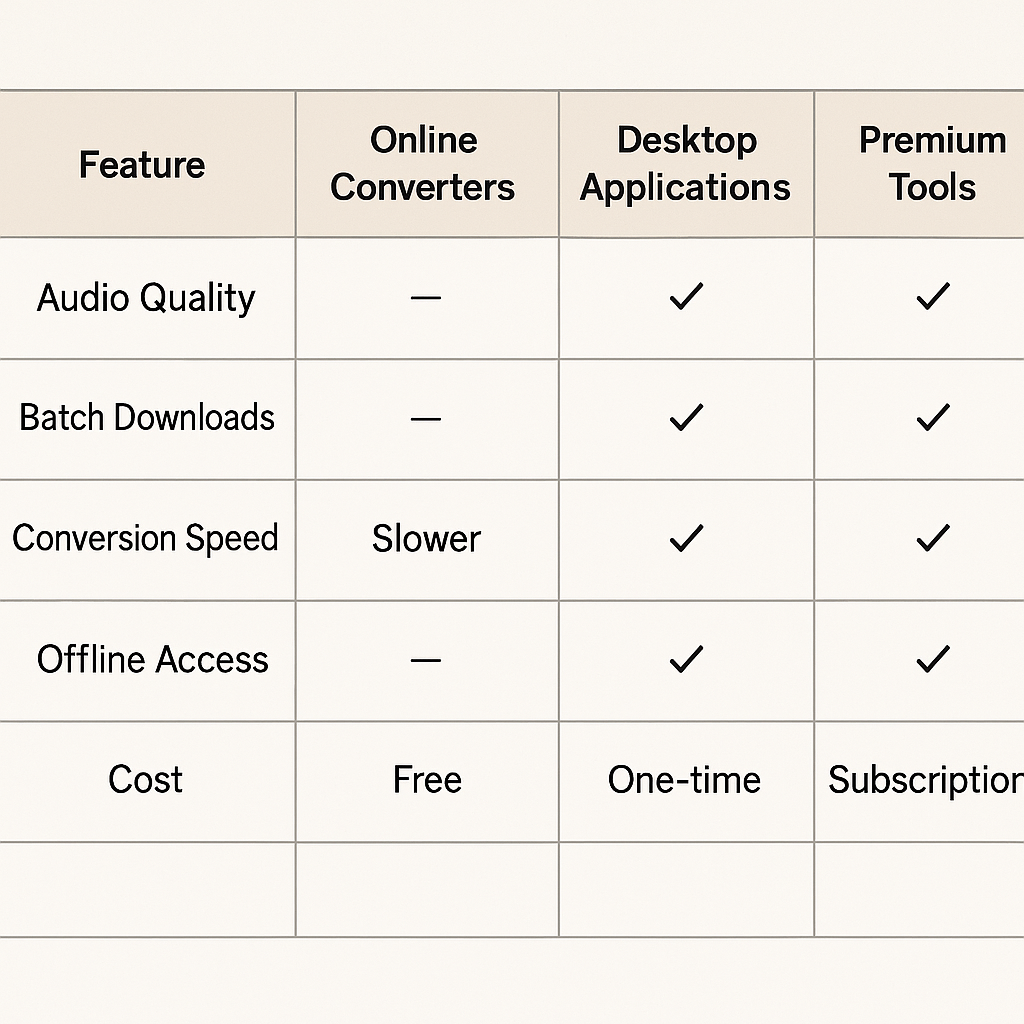
| Feature | Online Converters | Desktop Apps | Premium Tools | |------------------------------|-------------------|-------------------|--------------------------| | User-Friendly | Very Easy | Moderate | Very Easy | | Audio Quality | Basic 128kbps | Up to 320kbps | Up to 320kbps | | Supports Bulk Downloads | Limited | Yes | Yes | | Cost | Free | Usually Free | Requires Subscription | | Ads | Yes | No | No |
Conclusion
As more people opt for offline music enjoyment, knowing how to convert and download SoundCloud tracks becomes invaluable. This guide introduces a wide range of methods—from quick online converters to premium solutions—ensuring there's something for everyone. While some prioritize simplicity, others go for quality and batch features, offering you choices that align with your needs.
FAQs
Q: How do I download songs from SoundCloud?
A: If the track has a download button, that's your quickest route. Otherwise, utilize a SoundCloud downloader for other tracks without this feature.
Q: What's the best tool for converting SoundCloud to MP3?
A: For top-notch audio, premium tools like DRmare and NoteBurner are your best bets. For effortless conversions, Musicverter’s service offers great ease and quality.
Q: Can I get a 320kbps MP3 from SoundCloud?
A: Absolutely, if you use desktop applications or premium tools, you can achieve crisp 320kbps conversions with ease.

About the Author


