

How to Organize SoundCloud to MP3 Files: 8 Simple Habits
Download any SoundCloud Song or
WAV
AAC
FLAC
MP3
Try our SoundCloud Downloader above for free SoundCloud song downloads. Want more features? Try Premium today.

Why Your SoundCloud to MP3 Files Need a System
Saving a track takes a few seconds. Finding it again three months later is the hard part. If your Downloads folder is a wall of files called things like "track (3).mp3" and "Untitled-final-v2.mp3," you already know the feeling. A little structure fixes that. MusicVerter is a browser tool that turns public SoundCloud tracks into MP3 files, and what you do with those files after they land decides whether you end up with a music library or a junk drawer.
This guide covers eight simple habits for keeping SoundCloud to MP3 files tidy on a computer or phone. None of them need special software, and most take less than a minute per download. Whether you save a few tracks a month with MusicVerter or build crates for DJ practice, the same rules apply: one inbox, one folder pattern, clean names, and tags that match.
Before You Start: What a SoundCloud to MP3 File Carries
An MP3 has two layers of information. The first is the file name, which is what you see in a folder. The second is the tag data (often called ID3 tags) stored inside the file: title, artist, album, track number, genre, year, and cover art. Music players mostly read the tags, not the file name. File browsers mostly show the file name.
That's why a library can look perfect in one place and messy in another. A file named correctly with empty tags shows up as "Unknown Artist" in your music app. A file with great tags and a random name is hard to spot in Finder or File Explorer. Good organization keeps both layers in agreement.
It also helps to know where your music comes from. SoundCloud's own Help Center explains that some creators turn on a download button for their tracks, and that listeners with a Go or Go+ subscription can save music for offline play inside the app. Those offline saves live in the app, though, not in a folder you control. The habits below are for MP3 files you actually keep on your device, such as your own uploads, tracks creators let you download, or music you have permission to save.
8 Habits for Organizing SoundCloud to MP3 Files
1. Give every SoundCloud to MP3 download one inbox folder
Start by changing where new files go. Create a folder called something like Music / SoundCloud / _Inbox and point your browser downloads there, or move new files into it right after they finish. Every new track lands in one place, so nothing gets lost among PDFs, screenshots, and installers.
The inbox is a waiting room, not a home. Files stay there only until you name and tag them. If you let it grow to 400 files, you've just built a second Downloads folder.
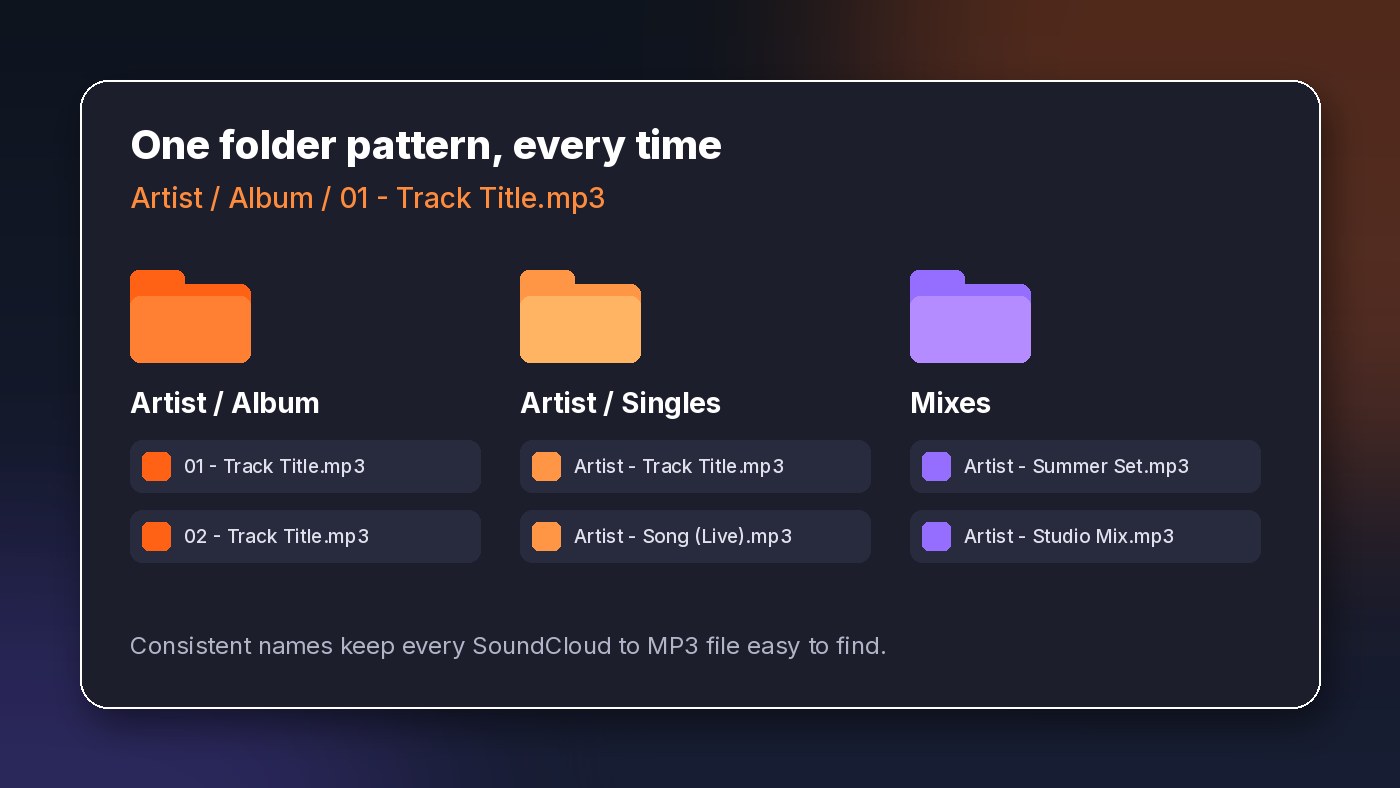
2. Pick one folder pattern for SoundCloud MP3 files and stick to it
The most common pattern, and the one almost every music player expects, is Artist / Album / 01 - Track Title.mp3. A lot of SoundCloud music doesn't come with an album, though. For those, a simple fallback works well:
- Artist / Singles / Artist - Track Title.mp3 for one-off tracks
- Mixes / Artist - Mix Name (Year).mp3 for long DJ sets and podcasts
- Playlists / Playlist Name / 01 - Artist - Track Title.mp3 for sets you save together
Which pattern you choose matters less than using the same one every time. One folder called "Lofi Beats" and another called "lofi-beats" will split your music in two without you noticing.
3. Rename SoundCloud to MP3 files the moment they land
Track titles on SoundCloud are written by uploaders, so they're often noisy: emojis, "FREE DL" banners, "[OUT NOW]," and three different spellings of "feat." Clean the name up while you still remember what the track is.
A good default is Artist - Track Title.mp3. A few rules keep names working on every device:
- Skip characters that some systems reject, like / \ : * ? " < > |
- Use two-digit track numbers (01, 02) so files sort in order
- Keep names short enough to read at a glance, roughly under 80 characters
- Move extra details, like "Remix" or "Live," into parentheses at the end
4. Fill in the SoundCloud to MP3 tags that matter most
You don't need to fill in every field. Three do most of the work: Artist, Title, and Album. Add Album Artist and Track Number for anything that belongs to a set. If the Album field doesn't match exactly across tracks, players treat "Vol. 2" and "Vol 2" as two different records.
Your computer can already edit basic tags. On Windows, right-click the file, choose Properties, then Details. On a Mac, add the file to the Music app and use Get Info. For bigger batches, a free tag editor lets you update dozens of files at once, which saves a lot of clicking.

5. Add cover art to your SoundCloud MP3 library
Artwork isn't only decoration. On a phone or in a car display, the cover is often the fastest way to recognize a track. If a file arrives without art, add a square image (around 500 to 1000 pixels wide is plenty) through the same tag editor or Get Info window. Use the artist's own track artwork where you can, so the file still looks like the release you found.
6. Keep SoundCloud to MP3 playlists in order
Playlists and DJ sets often only make sense in sequence. When you save a whole playlist, keep the track numbers in the file names and in the Track Number tag. That way the set plays in the right order in any player, even one that sorts alphabetically.
It's also worth saving a small text file in the playlist folder with the original SoundCloud link and the date you saved it. Later, when you wonder where a set came from or want to check the creator's page for new uploads, the answer is right there.
7. Sort SoundCloud MP3 files by how you listen
Folders are great for storage, but listening usually follows moods and moments: running, studying, a road trip, a practice session. Instead of copying files into several folders (which creates duplicates), build playlists inside your music player that point at the same files. One copy of each track, as many playlists as you like.
Genre tags help here too. Keep the list short and consistent. "House," "Deep House," and "deep house" as three separate genres will make smart playlists miss tracks.
8. Clean up and back up your SoundCloud to MP3 collection monthly
Set a reminder once a month. Empty the inbox, delete duplicates (sort by file size and name to spot them quickly), and fix any "Unknown Artist" files your music app flags. Ten minutes a month beats a full weekend of cleanup a year from now.
Then back up. Copy the whole Music / SoundCloud folder to an external drive or your cloud storage. Because your folder pattern is consistent, a restore puts everything back exactly where it was. Backups matter most for your own tracks and for music that may not stay on SoundCloud forever, like old mixes or demos a creator shared with you.
Organizing SoundCloud to MP3 Files on Your Phone
Phones are less flexible than computers, but the same ideas carry over.
On iPhone
Safari usually saves files to the Downloads folder in the Files app, either On My iPhone or iCloud Drive. Create a SoundCloud folder in Files and move new tracks there. Renaming works with a long press. For a fuller library with artwork and playlists, it's often easier to tag files on a computer first and then sync them to the phone.
On Android
Chrome saves to the Download folder by default. Use your file manager to move tracks into Music / SoundCloud, which most music player apps scan automatically. Many Android players also let you edit tags directly, so you can fix the artist and title right after saving.

Common SoundCloud to MP3 Organizing Mistakes
A few habits cause most of the mess people run into:
- Leaving everything in Downloads. It's the default, so it fills up fast, and music gets buried under everything else.
- Fixing the file name but not the tags. The file looks right in a folder but shows up as "Unknown" in your music app.
- Saving the same track twice. Search your library before saving something you think you already have.
- Mixing naming styles. "Artist - Title" in one folder and "Title by Artist" in another makes sorting useless.
- Skipping backups. A lost phone or a dead laptop shouldn't take your whole collection with it.
A Quick SoundCloud to MP3 Workflow You Can Copy
Here's the whole routine in five steps, start to finish:
- Copy the public track or playlist link from SoundCloud.
- Convert it in your browser and save the file to your _Inbox folder.
- Rename it as Artist - Track Title.mp3.
- Check the Artist, Title, and Album tags and add cover art if it's missing.
- Move it into its Artist, Mixes, or Playlists folder, and add it to a playlist in your player.
After a week or two this takes almost no thought, and your library stays easy to browse no matter how big it gets.
Start Your Next SoundCloud to MP3 Download the Organized Way
An organized library comes down to a few small decisions made the same way every time. Pick your folder pattern, clean up names as files arrive, fill in the key tags, and back everything up once a month. Your future self, scrolling for that one track, will thank you.
When you're ready to add the next track, paste the link into the MusicVerter SoundCloud to MP3 converter and save it straight into your inbox folder. Saving a full set you have permission to keep? The SoundCloud playlist downloader handles a whole playlist from one link, which makes keeping tracks in order much easier.
Organizing SoundCloud to MP3 Files: FAQ
What's the best folder structure for SoundCloud to MP3 files?
Artist / Album / 01 - Track Title.mp3 is the most widely supported pattern. For tracks without an album, use Artist / Singles, and keep long mixes in their own Mixes folder.
Why does my SoundCloud MP3 show "Unknown Artist"?
The file's Artist tag is empty or missing. Music apps read tags, not file names. Open the file's details or Get Info window and fill in Artist and Title.
Can I edit SoundCloud to MP3 tags without installing anything?
Yes, for basic fields. Windows lets you edit them under Properties and Details, and the Music app on a Mac has Get Info. A tag editor only becomes useful when you're fixing many files at once.
How do I keep a SoundCloud playlist in order after saving it as MP3?
Keep the track numbers at the start of each file name (01, 02, 03) and in the Track Number tag. Then the playlist plays in the right order in any player.
Where do saved SoundCloud to MP3 files go on my phone?
On iPhone, look in the Files app under Downloads. On Android, check the Download folder in your file manager. Move them into a dedicated music folder so your player picks them up.
Do I need an app to save SoundCloud tracks as MP3?
No. MusicVerter is a browser tool, so it works in the browser on your computer or phone with nothing to install. It works with public tracks only.

About the Author


