
.png)
SoundCloud
Downloader To MP3
Download any SoundCloud Song or
WAV
AAC
FLAC
MP3
Try our SoundCloud Downloader above for free SoundCloud song downloads. Want more features? Try Premium today.

Your Ultimate Guide to Downloading and Mastering Tracks on SoundCloud
Introduction
If you love music, there's a good chance you've explored SoundCloud. It's a bustling hub for discovering fresh tunes, sharing your tracks, and connecting with a diverse range of artists from around the globe. For many, converting those tracks to MP3 and mastering your audio for top-notch playback are key activities. In this guide, we'll walk you through using a SoundCloud downloader to convert tracks to MP3, delve into the world of audio mastering for SoundCloud, and share some insider tips to make your music shine online.
How to Download SoundCloud Tracks
Downloading tracks from SoundCloud might seem a little daunting if you're not sure where to start. With so many tools out there, finding a genuine and safe one can be a challenge. Let’s simplify the process with a step-by-step guide using trusted SoundCloud to MP3 converter tools:
- Choose a Reliable Tool: Opt for a reputable and free SoundCloud downloader like Musicverter's online tool. It's designed to offer a secure conversion without sacrificing quality.
- Copy the Track URL: Find the track you want on SoundCloud and copy its URL from your browser’s address bar.
- Paste the URL into the Downloader: Head over to the downloader site and paste the link in the designated field.
- Convert to MP3: Select your conversion preferences, such as MP3 320kbps for optimum quality, then hit 'Download' to get your track.
- Save Your File: Once the conversion's complete, save the MP3 file to enjoy offline listening anytime.
By following these steps, you can easily download from SoundCloud without losing audio quality.
![SoundCloud Downloader]()
Understanding SoundCloud Audio Mastering
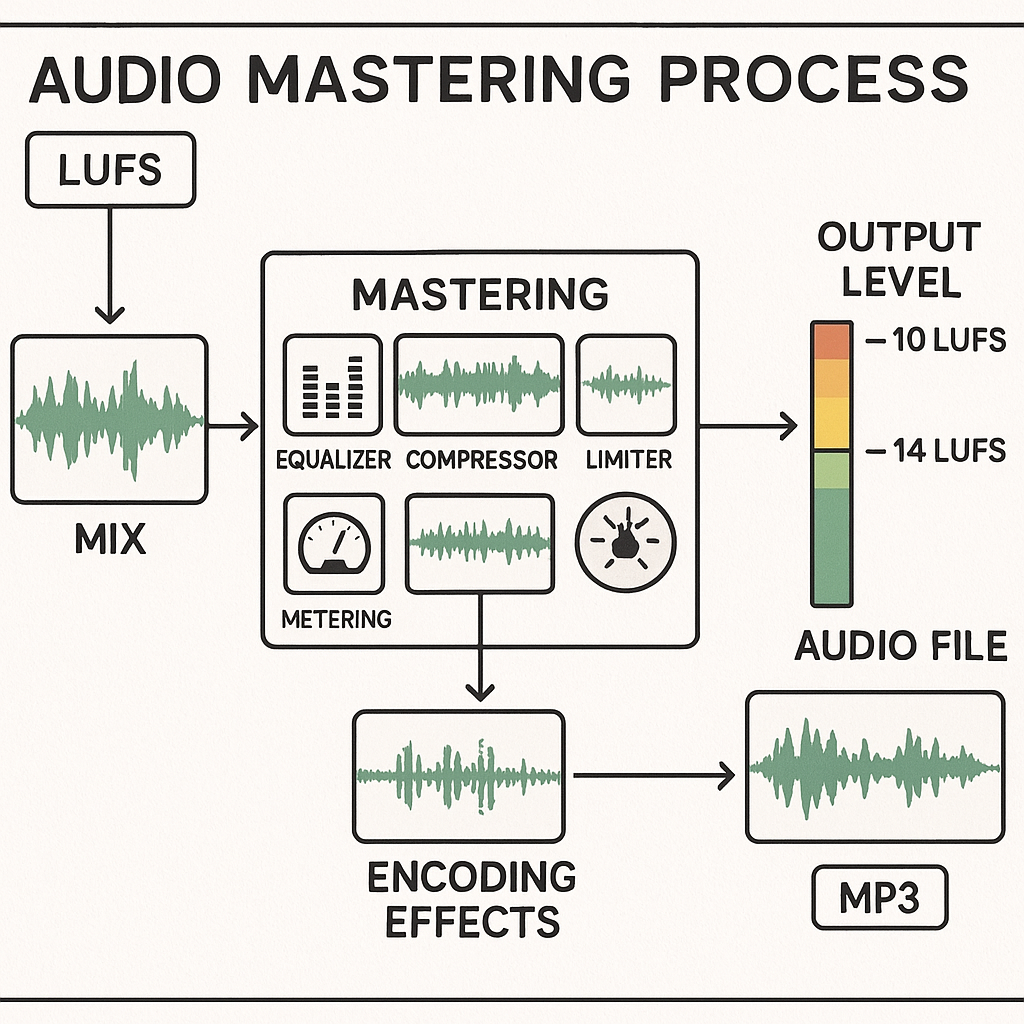
Mastering your music is key to ensuring it sounds fantastic across all platforms. Let’s break down what you need to know about mastering music specifically for SoundCloud:
- Why Mastering is Important: It gives your music a polished, professional edge by balancing levels and enhancing clarity.
- Normalization and LUFS Levels: SoundCloud adjusts audio to -14 LUFS to maintain consistent loudness throughout its content. Keeping your tracks at or below this level is crucial to avoid distortion while preserving musical dynamics.
- Encoding Effects: SoundCloud's audio re-encoding might introduce some artifacts if your original upload isn't prepared correctly. Keep your peaks slightly below full scale (around -1 dBFS) to prevent unwanted clipping.
SoundCloud's Own Mastering Service
Want to harness top-tier tools? SoundCloud offers an exclusive mastering service powered by Dolby. Here’s a quick look:
- Mastering Service Highlights: This service tailors high-quality sound optimization, ideal for artists striving to amplify their tracks' impact.
- Cost: Each master costs $4.99 a track, with discounts available for SoundCloud Pro Unlimited subscribers, making it appealing for frequent uploaders.
- Subscription Perks: Among the benefits for subscribers are discounted mastering services and enhanced distribution options.
Best Practices for Audio Quality
To make sure your music sounds its best on SoundCloud, keep in mind these expert tips:
- Loudness and Dynamics Optimization: Standardize your track loudness without going overboard with compression to keep the dynamics intact.
- Avoiding Distortion: Ensure your encoding output levels are below peak when converting to avoid any chance of distortion.
- High-Quality Formats: Start with high-quality audio files for the best conversion results. Aim for MP3 320kbps when using a SoundCloud to MP3 converter.
Conclusion
Navigating the world of downloading and mastering audio for SoundCloud doesn't have to be complicated. By using reliable tools like Musicverter’s SoundCloud downloader and following industry best practices, you’ll be well on your way to superb audio experiences. Whether you’re simply listening or creating, these steps will ensure your tracks stand out and sound vibrant. Dive into these possibilities today and elevate your SoundCloud journey!
FAQs
Q: How do I download songs from SoundCloud?
A: Check out a reputable SoundCloud downloader like Musicverter. Just grab the track link, paste it, and download it in MP3 format.
Q: What's the best SoundCloud to MP3 converter?
A: One of the simplest and most effective tools is Musicverter’s SoundCloud to MP3 converter for high-quality music downloads.
Q: Can I convert SoundCloud to MP3 320kbps online?
A: Absolutely! With Musicverter, you can convert SoundCloud tracks to MP3 320kbps, ensuring great audio fidelity.

About the Author


